Google Search Console AI Performance Reports: What They Track (and the Clicks Problem)
Google launched a dedicated Generative AI features performance report in Search Console, showing impressions in AI Overviews and AI Mode, plus a new toggle to block your content from AI responses. Here's what the report tracks, what it leaves out (clicks, position, queries), how to read it, and whether you should ever opt out.
On June 3, 2026, Google launched a dedicated “Generative AI features” performance report in Search Console (Beta), with separate views for Search (AI Overviews and AI Mode) and Discover, alongside a new toggle that lets sites opt out of appearing in AI responses.
- What the report gives you: Impressions only. An impression counts when your URL appears inside an AI feature, such as a citation in an AI Overview or a referenced source in AI Mode. You also get Pages, Countries, Devices (Search only), and Dates, hourly through monthly.
- What is missing, and why that is the story: No clicks, no position, no CTR, and no query data. Reporting impressions but not clicks is Google quietly acknowledging that AI features generate citations without sending proportional traffic. One widely-shared theory is that LLMs fetch pages directly to compose answers, so the citation registers but the click never does.
- What the opt-out toggle actually does: Removes your site from AI Overviews, AI Mode, and AI Overviews in Discover, while leaving normal indexing and ranking intact. Narrower than nosnippet and far less destructive than a robots.txt Disallow.
- Whether to use it: For almost every site, no. You lose AI visibility for zero ranking benefit.
- Who gets it first: A subset of UK site owners, driven by the CMA's conduct requirement giving Google about 9 months to ship publisher controls.
Global expansion and additional metrics are promised but not dated.
The new Search Console report tells you whether AI surfaces cite your pages, but not why. AI features pull from pages that are fast, cleanly structured, properly schema'd, and crawlable. CrawlRaven's 200-Point Audit checks every one of those factors, from $29/month. Try CrawlRaven free for 7 days: 1 website, no credit card →
On June 3, 2026, Google announced a dedicated Generative AI features performance report in Search Console, the most-requested report in GSC history. Two things shipped:
- The report. Site owners' first official view of how often their pages appear inside AI Overviews and AI Mode.
- An opt-out toggle, in testing, that lets sites remove themselves from AI responses.
Here is the report itself, from Google's own announcement:
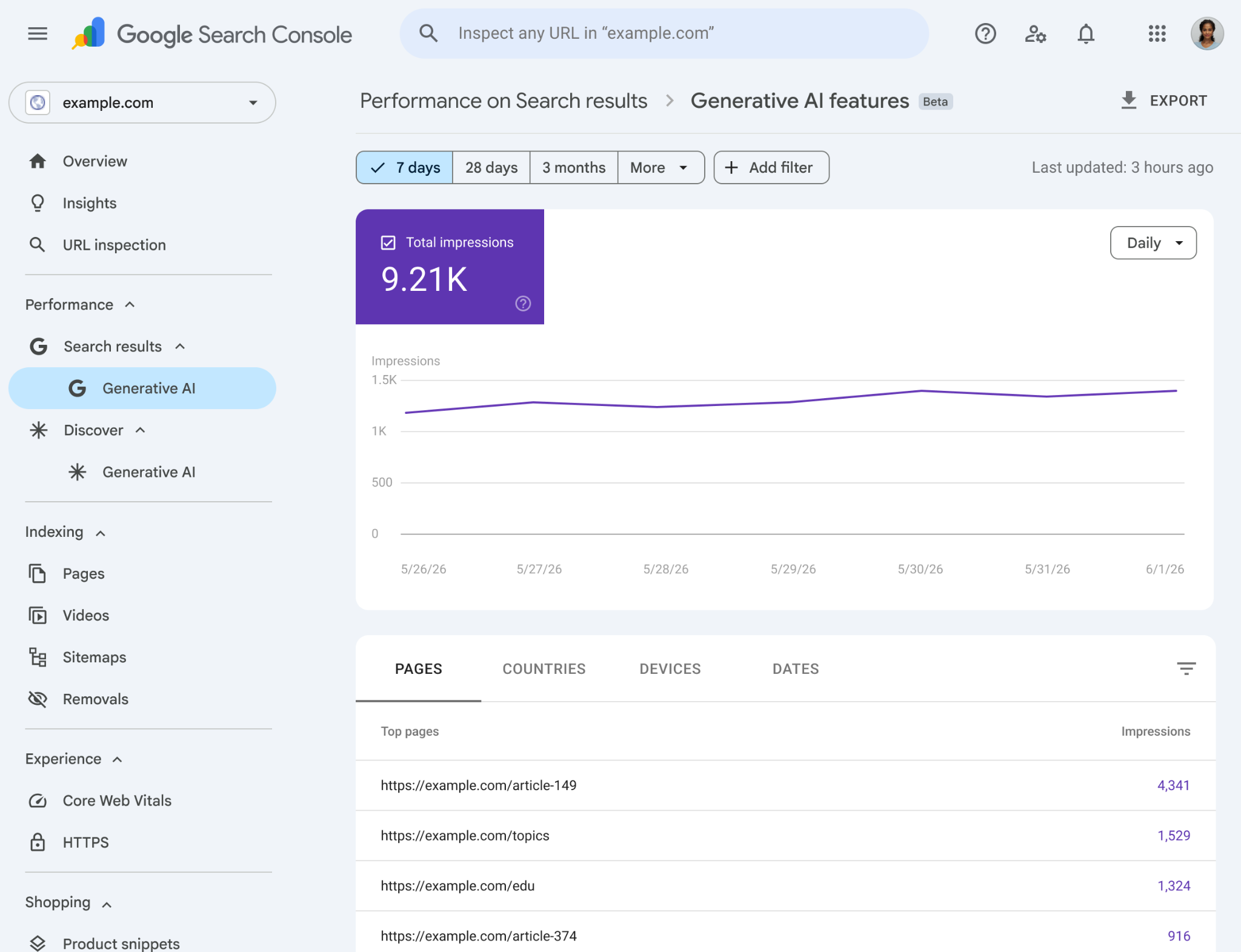
Source: Google Search Central, the new "Generative AI features" report under Performance, showing impressions in AI Overviews and AI Mode.
It is the second of two significant Search Console additions this year, alongside the platform properties that landed in July, and both follow the same pattern: more measurement, no new controls. It is also the only report of its kind anywhere: there is no Search Console for ChatGPT, Claude or Perplexity.
Most coverage is treating this as a feature announcement. The more useful read is what Google chose not to report: the v1 report tracks impressions and nothing else. No clicks, no position, no click-through rate, no query data. That single omission tells you more about the economics of AI search than any blog post will.
This piece breaks down:
- Exactly what the report shows, and how to read it in your own account.
- Why "impressions, not clicks" is the whole story.
- What the new opt-out toggle actually does, and what to do about all of it.
What does the Google Search Console AI performance report show?
The report lives under Performance in Search Console, with separate views for Search (AI Overviews and AI Mode) and for Discover (generative AI features in Discover).
An impression is counted when a URL from your site appears inside one of those AI features: a citation link in an AI Overview, say, or a referenced resource in AI Mode. Google's John Mueller later said that Search Console counts links, and counts a hidden link only after someone expands it.
The Generative AI features report: what it tracks vs. what it leaves out
Google Search Console · Beta · v1 launch
How often a URL from your site appeared inside a generative AI feature (a citation in an AI Overview or a referenced source in AI Mode).
Which specific URLs surfaced inside AI features, your top AI-cited pages, ranked.
Where your AI visibility is coming from, broken down by country.
Desktop / mobile / tablet split (Search view only, not Discover).
Trend over time with hourly, daily, weekly, and monthly granularity.
No click data. You can see you were cited, not whether anyone clicked through.
No ranking / placement metric inside the AI answer.
With no clicks and no position, there is no click-through rate to calculate.
No query-level breakdown of which prompts triggered your citation.
Google says it may add metrics over time based on feedback. At v1, the report answers "were you cited?", not "did it send you traffic?"
You can slice impressions four ways:
- Pages. Which URLs got cited.
- Countries. Where the visibility is coming from.
- Devices. Search view only.
- Dates. Hourly, daily, weekly, and monthly granularity.
That is genuinely useful: for the first time you can see which of your pages the AI surfaces pull from. But every one of those is a cut of the same single metric.
Why does the AI performance report show impressions but not clicks?
Classic Search Console gives you impressions, clicks, CTR, and average position. The AI report gives you one of those four. That is not an oversight; it is the most honest thing in the announcement.
Reporting that your content was shown inside an AI answer while staying silent on whether anyone clicked through quietly concedes the core tension of AI search: citations are increasingly decoupled from traffic.
Why "impressions, not clicks" says a whole lot
The same impression means two very different things on a classic SERP vs. an AI feature
A query runs on a classic SERP.
Counted as an impression in Search Console.
The browser follows your link.
Search Console logs a click + the destination URL.
A query triggers an AI Overview or AI Mode answer.
Your URL appears as a source, counted as an impression.
The generated answer often resolves the query in place.
Frequently no click-through happens, so there is nothing for the report to count.
One hypothesis for the gap: LLMs and AI surfaces fetch your page directly to compose the answer, bypassing the tracked click, so the citation registers but the visit never does.
What does "impressions, not clicks" tell us about AI search?
The sharpest one-line reaction came from Lily Ray, VP of SEO & AI Search at Amsive, who captured what every publisher was thinking:

New AI reporting features finally coming to GSC. Reporting on impressions and not clicks says a whole lot here 🫠 But yes, grateful to have any AI reporting at this point 🙏🏽 developers.google.com/search/blog/20…
Her point lands because impressions confirm your content is being surfaced in AI answers without revealing how much traffic, if any, that visibility sends back. There are at least two honest readings:
- Attribution is hard. Clicks may be genuinely difficult to attribute inside AI surfaces, since the answer often resolves the query in place.
- The number isn't flattering. The click data may simply not be good enough to lead with.
We can't see inside Google's decision, so we won't assert a motive. But as Ray notes, some AI reporting beats none, and the fact that impressions shipped first is worth sitting with.
Where did the clicks go? A theory from the SEO community
There's a plausible technical explanation for why AI impressions and clicks have drifted apart, raised a few days before the launch by Ilias Ism:

High impressions on Search Console, almost no clicks Why is this becoming more common? Because LLMs are now reading the content, not humans LLMs will scrape Google, but avoid the Google tracking link and instead do a direct fetch So the "click" never registers

The argument: LLM-driven surfaces read your content to compose an answer, but they fetch the page directly rather than routing a user through a tracked Google click. The citation registers as an impression; the visit, if it happens at all, never shows up as a click.
Treat this as one hypothesis rather than settled fact. But it fits the pattern the new report is built to measure: lots of impressions, conspicuously absent click data.
None of which means the channel stopped being worth working. The companies building these models are staffing for it: Anthropic advertised an SEO Lead at $255,000 to $320,000 and listed monitoring performance inside AI Overviews and answer engines as part of the job.
How do you find and read the AI performance report in Search Console?
If your property is in the rollout, open Search Console and look under Performance in the left sidebar, Google lists it as the Generative AI performance report, with separate reports for Search and for Discover (the Search report opens at the /performance/search-analytics/ai path). Once you're in:
- Start with Pages. Sort by impressions to find which URLs the AI surfaces cite most. These are your AI-visible assets worth protecting and expanding.
- Watch the Dates trend, not the absolute number. A 9K-impression month means little in isolation; the slope over weeks is what tells you whether your AI visibility is growing or eroding.
- Cross-reference with classic Performance. Compare AI impressions against your normal organic clicks for the same pages. A page with rising AI impressions but flat clicks is the "cited but not visited" pattern in action.
- Use Countries to check expansion. If you're targeting new markets, this is an early read on whether AI surfaces are picking you up there.
For a walkthrough of AI data appearing in Search Console, and the catch that comes with it, this video is a useful primer:
How does the new opt-out toggle for blocking content in AI responses work?
Alongside the report, Google is testing a toggle that removes your site from AI Overviews, AI Mode, and AI Overviews in Discover, while leaving normal indexing and ranking untouched. Discover matters more than it used to here, because it is the surface a claimed Google Search profile feeds into. Until now the only levers were blunt:
nosnippetsuppresses snippets everywhere.- A robots.txt
Disallowremoves crawling and ranking along with AI eligibility. The free robots.txt tester checks a specific URL against a specific bot, and the robots.txt generator writes a file that allows the AI search crawlers by default.
The toggle is the first control that targets only the generative AI layer.
Four ways to control your content in AI search, and what each one actually does
The new toggle is the first lever that blocks AI features without touching your web ranking
| Control | Removes you from AI Overviews / AI Mode | Keeps normal web ranking | Page still crawlable / indexable | Granularity |
|---|---|---|---|---|
New GSC opt-out toggle Beta · UK first | Yes | Yes | Yes | Whole property |
nosnippet meta robots / header | Yes | Mostly* | Yes | Per page |
Disallow (robots.txt) blocks crawling | Yes | No | No | Path / pattern |
Google-Extended model training only | No | Yes | Yes | Whole property |
*nosnippet removes the text snippet Google can show for the page across web search, Images, Discover, AI Overviews, and AI Mode, so it can dampen normal SERP appearance too. The new toggle is narrower: it targets only the generative AI layer and leaves indexing and ranking intact.
Should you opt out of Google's AI features?
For the vast majority of sites, flipping this toggle is the wrong move. You would be removing yourself from the fastest-growing discovery surface in search to protect clicks you are largely not getting anyway, trading visibility for nothing. The narrow cases where opting out can make sense:
- Paywalled or licensed content you don't want summarized.
- Legal or compliance constraints.
- A publisher making a deliberate strategic stand on AI content use.
Everyone else should stay in, keep their pages crawlable, and focus on being the citation. Brand impressions inside an AI answer still build awareness and downstream demand, even when the immediate click doesn't fire.
Why is the AI performance report rolling out in the UK first?
Both the report and the toggle are launching to a subset of UK website owners before anywhere else, and that is not a coincidence.
The UK's Competition and Markets Authority gave Google Strategic Market Status and issued conduct requirements that include giving publishers control over how their content is used in AI features. This launch is Google meeting a regulatory clock.
Why this launched in the UK first
A regulatory rollout, not a routine product launch
Both the report and the opt-out toggle roll out to a limited set of UK website owners before anyone else.
The CMA designated Google with Strategic Market Status and issued conduct requirements, including publisher controls over use of content in AI features. The UK is where Google is legally on the clock.
Google has roughly nine months to implement the required changes, though the regulator expects the key publisher controls available well before that deadline.
Google says it will expand availability to more website owners after testing, and may add metrics (potentially including clicks) based on feedback.
If you're outside the UK, you can't see the report or flip the toggle yet, but the directive that forced it (publisher control over AI content use) is the trend to plan around globally.
What should SEOs and publishers do now?
Whether or not you have the report yet, the moves are the same, and none of them is "opt out."
- Baseline your AI impressions. The moment the report appears in your property, export it. You want a starting line before you change anything.
- Track the impressions-to-clicks divergence. Build the comparison Google won't: AI impressions (new report) vs. organic clicks (classic Performance) for your top pages. Widening gaps are where AI is absorbing your demand.
- Keep AI crawlers in, not out. Confirm you're not accidentally blocking the surfaces that cite you. Citations require access: opting out, blocking via robots, or over-using
nosnippetall cost you AI visibility. - Audit whether you're technically citable. AI surfaces favor pages that are fast, cleanly structured, well-schema'd, and internally linked as topical authorities. That's a technical-SEO problem, and it's the one you can actually act on.
The report tells you whether AI surfaces cite you. It doesn't tell you why, or how to earn more. CrawlRaven's 200-Point Audit checks the technical factors AI features actually use to retrieve and cite sources: AI-crawler access, schema validity, Core Web Vitals, internal-link hubs, and content structure. Start free: 1 site, no credit card.
Key Takeaways
- →What launched: A dedicated Generative AI features performance report in Search Console (Beta), with separate Search and Discover views, plus an opt-out toggle for AI responses: June 3, 2026.
- →The metric: v1 reports impressions only: counted when your URL appears in an AI Overview or AI Mode. You also get Pages, Countries, Devices (Search), and Dates.
- →The omission: No clicks, no position, no CTR, no queries. Reporting impressions but not clicks is the real signal: AI citations are decoupling from traffic.
- →The toggle: Removes you from AI Overviews, AI Mode, and AI Overviews in Discover without touching indexing or ranking: narrower than nosnippet, far less destructive than robots Disallow.
- →Should you opt out: Almost never. You'd surrender AI visibility for no ranking benefit. Stay in, stay crawlable, and optimize to be the cited source.
- →Rollout: UK site owners first, driven by the CMA's conduct requirement (~9-month window). Global expansion and more metrics promised but not dated.
Primary sources used in this post
- Google Search Central: Introducing Search Generative AI performance reports in Search Console
- Search Console Help: Generative AI performance report (Search)
- Search Engine Land: AI performance reports and controls to block your content in AI responses
- Search Engine Journal: Google Tests Dedicated AI Search Reports In Search Console
- Lily Ray on X: "impressions and not clicks says a whole lot"
Related reading on CrawlRaven
- Search Console Platform Properties: Instagram, TikTok, X and YouTube
- Google I/O 2026: Every Major Search Update
- How to Rank in ChatGPT, Claude & Google AI Overviews (2026 Guide)
- 14 Best AI Visibility Tools in 2026
- DuckDuckGo Installs +30%: What the AI Search Backlash Means for SEO
- Google May 2026 Core Update: Tracking & Recovery
Frequently asked questions
What is the generative AI performance report in Google Search Console?
It is a dedicated report under Performance, announced 3 June 2026, covering the generative AI features in Google Search: AI Overviews and AI Mode, with a separate view for Discover. It reports how often your URLs appeared inside those features, broken down by page, country, device and date. Google calls it the Generative AI features performance report, and it is the most-requested report in Search Console's history.
How do I track Google AI Mode in Search Console?
Open Performance and switch to the generative AI features report, which counts AI Mode alongside AI Overviews rather than separating them. That is the limit worth knowing: you cannot isolate AI Mode from AI Overviews, and the report carries impressions only, so there is no way to tell how much traffic either surface sent you.
What are the AI controls in Google Search Console?
One control, shipped in testing alongside the report: a toggle that removes your site from AI Overviews, AI Mode and AI Overviews in Discover while leaving normal indexing and ranking untouched. It is the first lever that targets only the generative layer, where the older options, nosnippet and a robots.txt disallow, also cost you ordinary search visibility.
Can Search Console measure my AI visibility?
Only Google's part of it, and only as impressions. The report covers AI Overviews and AI Mode with no clicks, no position and no query data, and it says nothing about ChatGPT, Claude or Perplexity, none of which give site owners a console at all. Treat it as one platform's window rather than an AI visibility measure, and read the slope over weeks rather than the absolute number.
Does the Google Search Console AI report show clicks?
No. At launch (v1), the Generative AI features performance report shows impressions only, counted when your URL appears inside an AI Overview or AI Mode. There is no click data, no average position, no CTR, and no query-level breakdown. You can slice impressions by Pages, Countries, Devices (Search view only), and Dates. Google has said it may add more metrics over time based on feedback, but clicks are not included today.
What counts as an impression in the AI performance report?
An impression is counted when a URL from your site appears inside a generative AI feature on Google, for example, as a citation link in an AI Overview or a referenced resource in AI Mode (and the equivalent in Discover). It measures that your content was shown as a source, not whether anyone clicked through to your site.
How do I block my site from appearing in AI Overviews and AI Mode?
Google is testing a new opt-out toggle in Search Console that removes your site from AI Overviews, AI Mode, and AI Overviews in Discover while leaving your normal indexing and ranking intact. Before this toggle, the main options were the nosnippet directive (which suppresses snippets across all of Google, including AI features) or a robots.txt Disallow (which blocks crawling and ranking entirely). The new toggle is the first control that targets only the generative AI layer.
Will opting out of AI features hurt my Google rankings?
No. Google states the AI opt-out toggle does not affect your placement or ranking in standard, non-AI search results. It only removes you from generative AI features. That said, opting out is still rarely advisable: you give up visibility on the fastest-growing search surface for no ranking benefit. For most sites, staying in and optimizing to be cited is the better strategy.
When will the AI performance report and opt-out toggle reach the US and other countries?
Both features are rolling out first to a subset of website owners in the United Kingdom, driven by the UK CMA's conduct requirement that Google give publishers control over how their content is used in AI features. Google says it will expand availability to more website owners after testing, but has not given a specific date for the US or global rollout.
Is this the same as the AI Overviews query filter in the old Performance report?
No. The earlier capability let you filter the existing Search performance data by certain AI-related query types. The new Generative AI features report is a dedicated report with its own impressions data for AI Overviews, AI Mode, and Discover AI features: a separate, purpose-built view rather than a filter applied to classic Search data.

Co-founder, CrawlRaven · 6+ years building SaaS content & SEO products
Ayush has 6+ years of experience building SaaS products and content strategies in the SEO space. As co-founder of CrawlRaven, he writes from hands-on experience building deep-crawl audit tools and solving the technical SEO problems agencies actually face.